-
Shop
- Advanced Technologies
- Arts, Crafts & Hobbies
- Bathroom
- Best Sellers
- Car Accessories
- Dating & Social Skills
- Digital Resources
- Beauty
- Electronics & Technology
- Emotional Intelligence
- Home Styling & Organization
- Mindfulness
- Nutrition & Healthy Eating
- Personal Style & Fashion
- Pet Lifestyle & Wellness
- Positive Thinking
- Productivity
- Self Confidence
- Sleep Improvement
- Stress Management & Relaxation
- TikTok Growth & Monetization Mastery
- Travel & Adventure
- Yoga & Mind-Body Practices
- Education & Learning
- Family & Parenting
- Fashion
- Alexander McQueen
- Bags
- Bags & Wallets
- Balenciaga
- Belts
- Blazers
- Bottega Veneta
- Brunello Cucinelli
- Burberry
- Chanel
- Chloé
- Dior
- Dolce & Gabbana
- Dresses
- Etro
- Fendi
- Gucci
- Hats & Hair Accessories
- Jacquemus
- Jewelry
- Jil Sander
- Jimmy Choo
- Kiton
- Luggage
- Miu Miu
- Off-White
- Outerwear
- Prada
- Rick Owens
- Saint Laurent
- Socks & Tights
- Sunglasses
- The Row
- Tom Ford
- Valentino
- Valentino Garavani
- Versace
- Vivienne Westwood
- Watches
- Fashion Accessories
- Furniture
- Gadgets
- Health & Beauty
- Health & Wellness
- Home & Garden
- Home Electronics
- Home Supplies
- Kids & Babies
- Kitchen
- Lighting
- Mindset
- Patio, Lawn & Garden
- Personal Growth
- Pet Care
- Pet Supplies
- Pets
- Shoes
- Sport & Outdoors
- Super Deals
- Travel
- Wealth
- Wealth Building
- Budgeting & Saving
- Cryptocurrency Investing
- Debt Management
- Entrepreneurship & Business Growth
- Family Finance & Budgeting
- Financial Independence
- Financial Mindset & Psychology
- Financial Planning
- Frugal Living & Expense Hacks
- Goal Setting
- High-Income Skills
- Investing Basics
- Leadership
- Motivation
- Networking & Mentorship
- Passive Income Strategies
- Real Estate Investing
- Side Hustles
- Stock Market Investing
- Winter Fashion
- YouTube Shorts Best-Sellers
Wireless Gaming Keyboard: Hot-Swap, Gasket, 5-Layer Foam
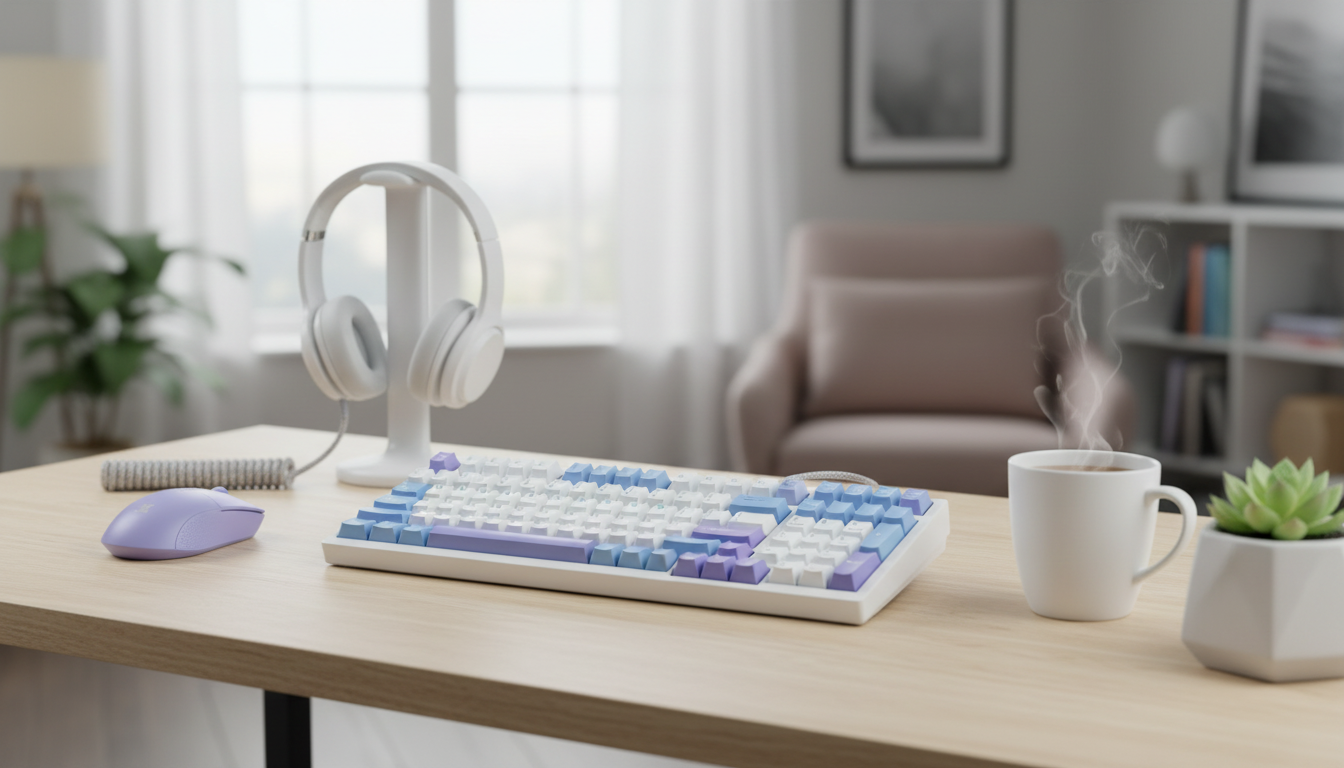
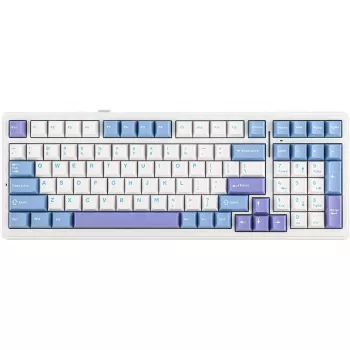
Wireless Mechanical Gaming Keyboard with Hot‑Swappable Gasket Build and Five‑Layer Padding
A wireless mechanical keyboard can feel as precise as a wired board when the layout, switch mounting, and sound-dampening are tuned for consistency. This model pairs hot-swappable switches with a gasket-mounted structure and five-layer padding to reduce harsh vibration, soften bottom-out, and keep keystrokes controlled during gaming sessions and long typing blocks.
If you want a clean setup without giving up the crisp, repeatable feel that makes mechanical boards great, the Wireless Mechanical Gaming Keyboard – Hot Swappable Gasket with Five-Layer Padding is built around the parts that most affect comfort and sound: a flexible gasket mount, easy switch swaps, and layered internal dampening.
What makes this keyboard feel different
The biggest difference comes from how the keyboard manages impact and vibration. Instead of letting every key press transfer energy straight into a rigid case, a gasket-mounted design isolates the internal assembly so the typing feel is softer and more even across the board.
- Gasket-mounted structure: Helps reduce case resonance and can make the board feel more consistent from edge keys to center keys.
- Hot-swappable sockets: Lets you change compatible switches without soldering, making it easy to tune actuation, sound, and overall feel.
- Five-layer padding: Works to absorb ping and hollow tones, so rapid inputs feel less sharp and the board sounds more controlled.
- Wireless capability: Supports a cleaner desk and easier device switching while still aiming for gaming-friendly responsiveness.
Wireless performance and everyday convenience
Wireless is as much about daily friction as it is about latency. A cable-free board keeps your desk cleaner, makes it simpler to move between rooms, and can switch from a desktop to a laptop setup without constantly re-routing cords.
When you first set it up, focus on practical benchmarks that translate to real play:
- Stable connection behavior: Inputs should land consistently without stutter during rapid taps.
- Quick wake: The keyboard should resume fast after sleep so the first key press isn’t “lost” when you sit down.
- Reliable pairing: Switching devices should feel predictable, not like a troubleshooting routine.
Placement can also matter more than people expect. Keep the receiver or paired device within clear line of sight when possible, and avoid crowding it next to noisy sources (some USB 3.0 environments can increase interference). For background detail on how input devices are standardized at a high level, the USB HID Usage Tables are a solid reference point, and for wireless protocol fundamentals the Bluetooth Core Specification is the canonical source.
If a wired mode is available, it’s also convenient for charging while playing and for firmware updates when supported.
Hot-swappable switches: fast tuning without soldering
Hot-swap support is one of the most practical quality-of-life features for a gaming keyboard because it turns “I wonder if I’d like this better” into a quick experiment instead of a soldering project.
- Linear switches: Often chosen for smooth, fast repeated inputs and a quieter profile.
- Tactile switches: Add a bump for feedback, which can help avoid accidental key presses during typing-heavy work.
- Clicky switches: Deliver loud, pronounced audible confirmation—fun for some setups, usually a poor fit for shared spaces.
Switch choice also interacts with keycaps. Lower-profile caps can feel faster and more immediate, while taller profiles can give your fingers more leverage and comfort for longer typing. When swapping switches, power the keyboard off, inspect switch pins before insertion, and press straight down evenly so sockets don’t get stressed.
Don’t overlook stabilizers. Large keys like the spacebar, enter, and shift can define how “premium” a board feels. Proper seating reduces rattle, and optional maintenance like careful lubrication can smooth sound and motion if you enjoy tinkering.
Gasket structure and five-layer padding: comfort, sound, and control
Gasket mounting is about more than acoustics—it changes how the keyboard handles impact. Compared with rigid tray-style mounting, a gasket build can distribute force more evenly and reduce the sharpness of bottom-out, which many users find less fatiguing over long sessions.
Setup checklist and quick tweaks
For longer gaming blocks, building a quick reset routine can help keep focus and hands relaxed. If you like structured break ideas away from the desk, How To Relax Your Body And Live With Less Stress and the Checklist: Bright Mind Boost — Your Simple Daily Guide to Staying Positive can complement a comfort-first setup.
Feature snapshot
| Build element | What it affects | Why it matters for gaming/typing |
|---|---|---|
| Wireless connectivity | Desk setup, mobility, multi-device use | Cleaner setup and easier switching without sacrificing comfort |
| Hot-swappable sockets | Switch feel and sound customization | Allows fast experimentation and replacement without soldering |
| Gasket mounting | Keystroke softness and vibration control | More consistent bottom-out and reduced harshness during long sessions |
| Five-layer padding | Acoustic profile and case resonance | Less ping/hollow sound; more solid feel under fast presses |
Who this keyboard suits best
FAQ
What does “hot-swappable” mean for a mechanical keyboard?
It means you can remove and replace compatible mechanical switches without soldering, which makes customization and repairs much easier. Power the keyboard off before swapping and check that switch pins are straight before pressing them in.
Does gasket mounting change performance or just sound?
Gasket mounting mainly changes typing feel and comfort by softening bottom-out and reducing vibration, and it often improves perceived acoustics too. “Performance” is less about raw speed and more about consistency and reduced fatigue over longer sessions.
How does five-layer padding affect the typing sound?
It typically reduces case resonance, cutting down on ping and hollow tones for a more muted, solid sound. The final result still depends heavily on your switches, keycaps, and stabilizer tuning.
Recommended for you
Was this article helpful?
Yes
No









Leave a comment